Check your charge port first — it may make this page unnecessary
The industry is midway through the switch to native NACSports, and vehicles built on shared platforms have moved at the platform’s pace rather than the badge’s. Go and look:
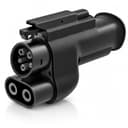
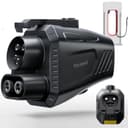
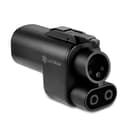
- A CCS1 port— a J1772 shape on top with two large DC pins below — is the case this page is about. A NACS-to-CCS adapter is what lets it use a Supercharger.
- A native NACS port means you plug into a Supercharger directly and need nothing here. What you would want instead is the opposite adapter, so the car can use CCS stations.
Our connector guide has photographs of each if you are unsure. This is a two-minute check that saves buying the wrong part.
The order to check things in
1. Honda’s own adapter program.Start here. Where an automaker supplies or endorses an adapter for its vehicles, use it — it has been validated against your car’s charging hardware and it avoids awkward warranty conversations if something goes wrong at a stall. Check Honda’s owner site and app for your model year specifically.
2. GM’s technical guidance for the platform.This is the Prologue-specific step. Because the vehicle shares GM’s architecture, GM technical documentation about how the platformhandles adapters, handshakes and DC charging is frequently the more accurate description of what your car will actually do — even though your dealer, warranty and app are Honda’s. Treat it as engineering context, not as a substitute for Honda’s official answer.
3. Account enrollment and site availability.Non-Tesla Supercharger access is account-based and rolls out site by site. Being physically able to plug in is not the same as being authorized to charge. The Tesla app, Honda’s own app and the DOE’s Alternative Fuels Data Center station finder all show which locations are open to non-Tesla vehicles.
4. Then buy the adapter, prioritizing one whose listing names UL 2252— the safety standard written for EV coupler adapters. This part carries several hundred volts of DC in the weather while you hold it, which is why our main NACS-to-CCS roundup ranks the whole category on certification before price.
What an adapter does not do
It does nothing for charging at home, which is AC through a completely separate system. If that is the other half of your problem, our home-charger roundup for the Prologue works from the 34.1 miles per hour Honda publishes on its own spec sheet.
Worth stating plainly, because it is the source of most disappointment. An adapter is a passive connector translator. It changes the shape of the plug and passes the pins through. It does not:
- Convert voltage. Whatever the station and the car negotiate is what happens. If the architectures do not match well, the adapter cannot fix it.
- Authorize you. If your account or your vehicle is not enabled for non-Tesla Supercharging, the session will not start.
- Increase your car’s DC charging ceiling. Your vehicle accepts what it accepts.
Our guide to what an adapter does and does not cost you in charging speedgoes into this properly — it is the question owners ask most and the one with the most confident wrong answers online.
The practical stuff at the stall
The parking problem.Supercharger stalls were laid out around Tesla’s own charge port position and short cables. If your port sits somewhere else on the car, you may find yourself reversing in at an odd angle or straddling two bays. Annoying at a quiet site, genuinely awkward at a busy one, and worth discovering in a parking lot near home rather than on a trip.
Support the weight. The adapter adds length and mass to the connector, and all of it hangs on your charge port. Take the weight with a hand while seating it, and rest the assembly rather than letting it dangle for the whole session.
Prefer an interlock. An adapter with an electronic interlock cannot be pulled off while current is flowing. On a DC part this is a meaningful safety feature rather than a convenience one, and it is why the FOCSPROD unit is on this list at its price.
Is it worth buying at all?
The honest calculus for most Prologue owners: an adapter buys you coverage, not speed. The Supercharger network’s advantage is that there is one nearby, it works, and the stalls are not all broken — which on a long trip matters more than peak kilowatts. If your normal routes have solid CCS coverage, you may genuinely not need one.
Where it earns its money is thin-coverage regions, unfamiliar routes, and the evening when the one CCS site on your route is occupied or down. Our public charging guide covers how to set up accounts and apps before you need them, which is the free half of solving this problem.
And for the charging you do most — at home, overnight, on AC — none of this applies. That is a different connector, a different adapter and a different decision, covered in our home charger roundup.