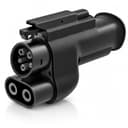
What 500A and 1000V actually mean
These two numbers are the adapter’s envelope, not a performance claim. They say the part is rated to pass up to 500 amps at up to 1000 volts without exceeding its thermal and insulation limits.
Why that matters: the whole envelope of a Supercharger stall sits comfortably inside those figures. An adapter rated at or near what a station can deliver has no margin, and margin is precisely what you are buying. Under sustained DC current, resistance at a contact generates heat, heat raises resistance, and the cycle compounds. A part rated far above its actual duty simply never enters that spiral.
The 1000V figure is the forward-looking half. Most CCS cars on the road today run around 400V, but 800V architectures are increasingly common — and 800V cars are exactly the ones with the most demanding fast-charge sessions. A 1000V-rated adapter is not going to be the limiting factor as those become the norm.
What the adapter does not control: your charging speed
This is worth being blunt about, because adapter listings routinely imply otherwise. The adapter does not make your car charge faster. Your session speed is negotiated between the station and your car’s battery management system, and it is bounded by:
- The station’s output and how many cars are sharing the cabinet.
- Your car’s maximum DC rate and its charge curve, which tapers steeply as the battery fills.
- Battery temperature.A cold pack charges dramatically slower — see our cold weather guide.
- Voltage architecture.An 800V car on a 400V-native Supercharger stall can be limited well below its headline figure. This is the single biggest disappointment for Ioniq 5, EV6 and similar owners — covered in our Ioniq 5 and Kia EV6 pages.
A good adapter’s job is to be invisible: to pass whatever the session negotiates without becoming the weak link. That is the entire brief, and it is why build quality rather than headline numbers is the right thing to shop on.
Before you buy: the compatibility checklist
Work through these in order. Each can independently stop the plan, and doing them in sequence prevents an expensive drawer ornament.
- Confirm your charge port is CCS1, not native NACS.Automakers have been transitioning. If your car already has a NACS port you do not need this adapter at all — you plug straight in, and the adapter you might want is the opposite direction. Go and look at the port.
- Confirm your vehicle is enabled for Supercharger accessin your automaker’s app or Tesla’s. This is account-based and vehicle-specific. If it is not enabled, the stall will not deliver power no matter what you are holding.
- Check whether your automaker supplies its own adapter.Where one does, that is the one to use — it has been validated against your car’s charging hardware and it keeps warranty questions simple. Ford, Rivian, Hyundai, Kia, GM and others have run adapter programs on different timelines. Our per-vehicle pages for Ford, Rivian and BMW cover what to check.
- Check stall type and cable reach.Supercharger cables are short and designed around a Tesla’s rear-left port. An adapter adds length to the connector, which sometimes helps and sometimes makes an awkward park impossible. Expect to reverse into some stalls or take two spaces at older sites.
Living with a DC adapter
Inspect the pins before every session. This is not fussiness. The contact surfaces are where hundreds of amps transfer, and debris, corrosion or visible pitting are reasons to stop using it. A ten-second look before you plug in is the whole maintenance regime.
Store it in a hard case.An adapter rolling loose in a trunk gets knocked, and grit works into the pins. A rigid case costs around ten dollars — see our charging accessories roundup — and it is the cheapest protection available for the most expensive adapter you own.
Support the weight.A DC adapter plus a Supercharger cable is heavy, and all of that load hangs on your car’s charge port. Where the geometry lets you, support the assembly rather than letting it dangle.
Stop if it gets hot. Warm is normal on a DC session. Hot enough that you would not want to hold it is not, and it means ending the session and inspecting the adapter before using it again.
What the listing does not publish
The listing publishes its current and voltage ratings and its connector direction. It does not publish a warranty term or an operating temperature range in the title, so both read “Not published” in the table above rather than being filled in. If you are weighing this against alternatives, our Lectron vs A2Z comparison puts the two best-known options side by side, and the full roundup covers the rest of the field including units that publish an interlock.